[providers.my-agent]
command = "my-cool-agent"
args = ["--some-flag"]
resume_args = ["--continue"]
Bring any CLI
Claude, Codex, OpenCode ship as defaults. Anything else is a TOML block away. No adapters, no JSON-RPC, no protocol layer.
 v0.5 · macOS + Linux + WSL
dux (pronounced "dooks") is a terminal UI for orchestrating multiple AI coding agents in parallel, each in its own git worktree. No protocol layers. No adapters. Just real CLIs in real terminals. And it's all yours to tune: every setting, down to every keybinding dux controls, is configurable and documented inline in the config file.
$ curl -sSfL https://getdux.app/install.sh | bash
Sniffs your OS + arch, drops dux in ~/.local/bin (or /usr/local/bin).
$ brew install patrickdappollonio/tap/dux
Tap and install in one shot. Life's too short for two-command installs.
$ npm install -g @patrickdappollonio/dux
Yes, a terminal app on npm. It travels well, don't @ me.
$ npx -y @patrickdappollonio/dux
Run it once, forget it ever existed. Astonishingly low commitment.
$ curl -sSfL https://github.com/patrickdappollonio/dux/releases/latest/download/dux-<os>-<arch>.tar.gz | tar xz && mv dux ~/.local/bin/
The hands-on route: swap <os>-<arch> for your platform (macOS/Linux · amd64/arm64), or just browse the Releases page. Then drop dux wherever you want on your PATH.
New releases, new tricks, and the occasional behind-the-scenes. No spam, no daily drip. Unsubscribe whenever.
Most AI coding tools give you one agent in one directory. dux gives you unlimited agents across unlimited worktrees, all visible at once. Spawn five agents on five branches and let them work in parallel.
Your projects and agent sessions, plus the companion terminals list. Click. Switch. Sorted.
The agent's live terminal: full PTY, full output, the same CLI you'd run by hand.
Staged files, syntax-highlighted diffs, AI commit messages. The full git dance, toggleable away when you want room.
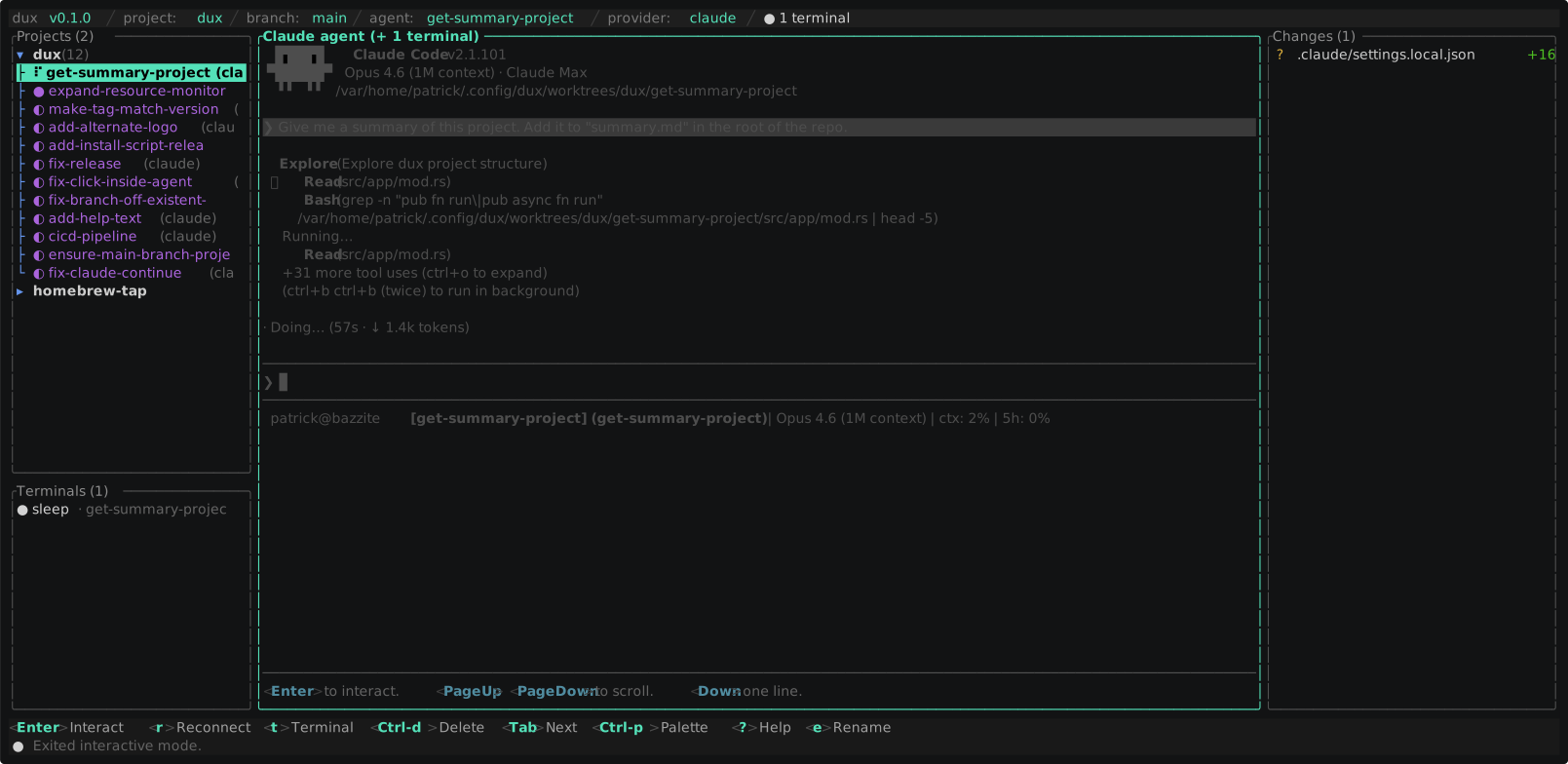
dux spawns the actual CLI (claude, codex, opencode) in a real pseudo-terminal, exactly as it would run in your shell. No ACP. No JSON-RPC. No adapter binary cosplaying as your agent.
Skip the protocol tax. Agent protocols like ACP are increasingly metered and billed on their own. Generous to start, sure, but a separate meter all the same. Running the real CLI keeps you on the subscription and auth you already pay for.
Keep everything that makes your agent yours. Your skills, MCP servers, hooks, slash commands, and permission prompts all work, because dux doesn't touch your setup. It just runs the tool you already configured.
no protocol layers · no adapters · no JSON-RPC · just PTYs
Lost? Ctrl-P opens the command palette.
Every action lives there, even the ones you forgot existed.
Every dux feature exists because someone (read: me) got tired of doing it the dumb way. Hover over any tile for a closer look.
Claude, Codex, OpenCode ship as defaults. Anything else is a TOML block away. No adapters, no JSON-RPC, no protocol layer.
Opaline TOML format. Bundled dux_dark, catppuccin, nord, dracula, gruvbox, tokyo night, and more, or define your own with eight colors. change-theme live-previews before you commit.
Watch every theme in actionStop typing the same prompt over and over. Save it as a macro, fuzzy-find it from a quick-select bar, fire it into the agent or the companion terminal. Multi-line prompts land as one piece, not confetti.
Fuzzy-searchable access to every action in dux, including ones with no keybinding. Forget a shortcut? Just open the palette.
Every agent gets its own shell session in the same worktree. Build, test, grep, poke around, all without leaving dux. Spawn as many as you want.
Some repos demand a ritual before they're useful: install deps, warm caches, link env files, whatever goblin dance your project needs. dux runs your startup script in the new worktree before the agent even boots.
Paste a PR number or URL. dux resolves it, fetches the head branch, and drops you into a fresh worktree with an agent ready to review or push back. GitHub Enterprise remotes are invited too. No sitting outside with the weird remotes.
Authenticate gh and dux tracks your PRs with open / merged / closed pills right in the pane, opens them in your browser, and lets your agents cut commits and pull requests without leaving the worktree.
It's Rust. Idle, dux sits under 50 MB of RAM, leaving the memory for the agents that actually need it. The resource-monitor command shows live CPU and memory for dux and every agent it runs.
A TUI that doesn't punish you for reaching for the mouse. Click a pane to focus it, click a file to open its diff, drag the borders to resize, wheel through scrollback, and drag across the terminal to select text. Keyboard-first, mouse-friendly.
Closed your laptop mid-thought? Flip on auto-reopen and agents still running when dux exited come back on next launch, resumed where they left off. Clean exits stay closed. Not every zombie deserves resurrection.
Edit config.toml, run reload-config, keep working. dux validates first and applies changes live; fat-finger the TOML and it keeps the last good config and shows you the error. No restart pilgrimage.
Change the CLI on a worktree on the fly, Claude to Codex and back. Used that provider here before? dux passes its resume args so you pick up the prior conversation instead of starting cold.
Already have a worktree lying around? dux adopts it. Managed ones reconnect as continuable sessions; external ones get copied in (dirty and untracked files intact), leaving your original checkout alone. Bring that "temporary" worktree in without admitting how long it's been temporary.
One key and the agent's worktree opens in your editor (Cursor, VS Code, Zed, Antigravity), auto-detected on your PATH. open-worktree-with lets you pick which one, per open.
The right pane is the full git dance: stage and unstage files, read syntax-highlighted diffs (computed in-process with similar + syntect, not shelled out), write a commit, push, and pull, all without leaving dux.
Your worktrees are user data, so dux handles git with care: source refresh is --ff-only (never a surprise merge or rebase), new agents branch from the project's leading branch, and destructive actions always ask first.
Inject env vars into agent terminals, companion shells, and startup commands, globally or per-project, with ${VAR} expansion so secrets come from the parent environment, not the config file. Project values win over global.
Every setting is configurable. Every setting is commented inline. You should never have to leave the file to figure out what an option does. dux writes a fully annotated config.toml the first time it launches: themes preselected, keybindings ready to remap, providers wired in.
dux config path prints where it lives.
dux config diff shows what you've changed from defaults.
dux config regenerate previews the latest default config.
Safe to commit to git.
Project paths take $HOME, ${HOME}, or ~, and env values expand ${VAR} from your shell, so secrets stay as references, never hardcoded. The file holds portable intent (projects, providers, themes, keybindings), not runtime state. Drop it in your dotfiles and it travels between machines without leaking your username.
# Where projects live. Supports $HOME, ${HOME}, and ~ so you can
# share this file between machines without leaking your username.
[[projects]]
id   = "a4f3..."
path = "$HOME/projects/web-app"
name = "web-app"
env  = { EDITOR = "true", API_KEY = "${FOO_KEY}" }

# Some projects need a little ceremony before an agent is useful.
# Suffering builds character, but so does automating the ritual.
startup_command = """
npm install
ln -sfn "$DUX_WORKTREE_PATH/.env.local" .env
"""

[providers.claude]
command     = "claude"
resume_args = ["--continue"]

[macros]
"Review"  = { text = "review this for bugs", surface = "agent" }
"Build"   = { text = "cargo build --release", surface = "terminal" }
"Ship it" = { text = "run tests, fix, commit", surface = "agent" }

[ui]
theme              = "dux_dark"   # or catppuccin_mocha, nord, dracula...
auto_reopen_agents = true         # pick up where you left off

[keys]
quit          = ["q", "ctrl-c"]
open_palette = ["ctrl-p"]Pick whichever one makes you feel the least guilty. They all end with you running dux in a terminal.
The only hard requirement is git (dux is built on worktrees). Beyond that the CLI needs no dependencies. The gh CLI is optional: install it for PR tracking and agent-opened PRs; skip it and dux quietly disables anything GitHub.
$ curl -sSfL https://getdux.app/install.sh | bash
Sniffs your OS + arch, drops dux in ~/.local/bin (or /usr/local/bin).
$ brew install patrickdappollonio/tap/dux
Tap and install in one shot. Life's too short for two-command installs.
$ npm install -g @patrickdappollonio/dux
Yes, a terminal app on npm. It travels well, don't @ me.
$ npx -y @patrickdappollonio/dux
Run it once, forget it ever existed. Astonishingly low commitment.
$ curl -sSfL https://github.com/patrickdappollonio/dux/releases/latest/download/dux-<os>-<arch>.tar.gz | tar xz && mv dux ~/.local/bin/
The hands-on route: swap <os>-<arch> for your platform (macOS/Linux · amd64/arm64), or just browse the Releases page. Then drop dux wherever you want on your PATH.
The shell installer takes a couple of env vars when you want to override its defaults.
~/.local/bin when it exists and is on PATH, else /usr/local/bin.
Release notes, what's being worked on, and the occasional deep dive.
A little corner of getdux.app for release notes, works-in-progress, and the occasional rabbit hole.
Every fix, feature, and bug report from the community helps dux get better. Thank you.

